Website design and development
How To Create A Startup Website Without A Developer (Step-by-Step)
8 min
Posted on:
Updated on:

written by

Stan Murash
Writer
reviewed by
Early-stage startup websites are usually simple — a few pages, clear messaging, and one goal: get someone to care. The real bottleneck isn’t code. It’s knowing what to say and how to structure it.
At Tribe, we see this constantly with AI, Web3, and EdTech founders — they don’t need more tech, they need a site that looks credible and ships fast.
Let’s break down how to create a startup website without touching code.
Key Takeaways
You don’t need a developer to launch — you need clear messaging and structure
Most startup websites are 3–5 pages, not complex platforms
Speed beats perfection — launch fast and iterate based on real users
Tools like Framer or Webflow are enough for early-stage validation
Writing your copy before designing will save you days (and improve conversion)
Templates are a shortcut — not a compromise
Trust signals matter more than visuals in early-stage markets
Your first website is a test, not a long-term asset
Why You Don’t Need A Developer (Yet)
Most founders overestimate what startup website design and development actually implies — and underestimate how much speed matters early on.
Most startup websites are not complex
No custom backend. No advanced logic. No reason to bring in a developer just to “make it real.”
In fact, most of what people think is “development” is just layout, content, and basic interactions — all handled by no-code tools today.
Speed matters more than perfect code
The biggest risk early on isn’t technical debt.
It’s building too slowly.
If your site takes 2–3 months to launch, you’ve already lost momentum — especially in fast-moving spaces like AI or Web3.
A simple site live in a week beats a perfect one stuck in Figma.
Your real goal is validation — not scalability
Here’s the part most guides skip: Your first website is not infrastructure. It’s a test.
You’re validating:
Does anyone care?
Do people sign up?
Can you explain what you do clearly?
That’s why structure and messaging matter more than tech.
Once you have traction, then you can worry about developers.
Until then — speed, clarity, and credibility win.
What A Startup Website Actually Needs (And What It Doesn’t)
Building a website is about removing everything that doesn’t help someone understand — and trust — your product.
The 5 essential pages
You don’t need 15 pages. You need 3–5 that actually do their job:
Homepage — what you do, who it’s for, why it matters
Product / Service page — how it works, what you’re offering
About page — credibility (team, story, context)
Contact / CTA page — one clear action (book, sign up, apply)
Optional blog — only if you plan to use it consistently
That’s the baseline.
Anything beyond this is usually premature optimization.
What actually drives results
It’s not the tool. It’s not the animation.
It’s three things:
Clear messaging — can someone understand what you do in 5 seconds?
Trust signals — logos, testimonials, real screenshots
Simple UX — no friction, no confusion, no guessing
That’s it.
A simple, well-structured site will outperform a “designed” one every time. So you better focus your time on a clear startup branding strategy than cool animations.
Because your website isn’t a standalone asset.
It’s your most important one.
The No-Developer Stack (Tools That Actually Work)
Tools matter — but not as much as you think.
You can build a solid startup website with almost any modern no-code builder. The difference comes from how you structure it, not which logo is in your footer.
Still, here’s a stack that actually works in practice.
Website builders
This is your core layer — where your site lives.
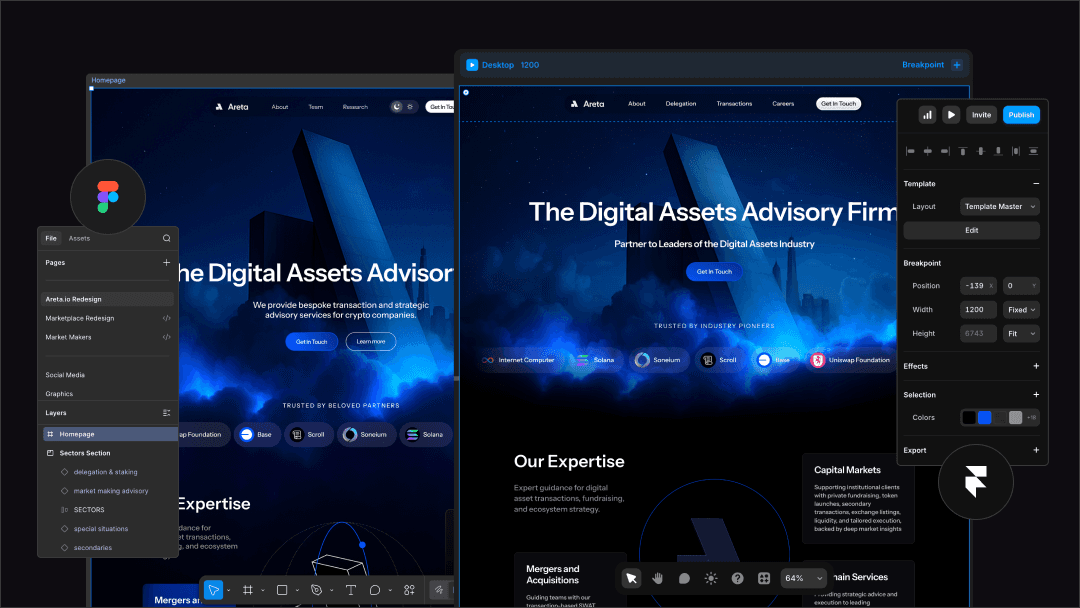
Framer — fastest way to get a clean, modern site live
Webflow — more control, slightly steeper learning curve
Carrd — perfect for ultra-simple MVPs or waitlists.
If your goal is speed (it should be), Framer is usually the best starting point. It removes most of the friction between idea → live site — which is exactly what early-stage founders need. For more info, check out our article Framer vs Webflow for startups.
CMS & content
You don’t need a complex CMS early on.
Most builders already include:
basic CMS for blog or updates
simple editing directly on the page
If you want something external:
Notion (for lightweight content workflows)
But honestly — this is optional until you’re publishing regularly.
Forms & integrations
You need one thing here: a way to capture intent.
Tally — clean, fast, no friction
Typeform — more polished, slightly heavier
Use these for:
waitlists
demo requests
early user feedback
Don’t overcomplicate this. One form is enough.
Hosting & domains
Handled for you.
No-code builders already include:
hosting
SSL
performance optimization
domain connection
This is another reason you don’t need a developer early on — the entire “infrastructure” layer is abstracted away.
Step-By-Step: How To Create A Startup Website Without A Developer
This is where most guides get vague.
So let’s make it practical — this is the exact flow we’ve seen work for early-stage founders who need to ship fast.
Step 1 — Define your one goal
Before you touch any tool, answer this:
What do you want people to do on your site?
Join a waitlist
Book a demo
Apply to a program
Start using the product
Pick one.
If your site tries to do everything, it’ll do nothing. Focus creates clarity — and clarity converts.
Step 2 — Write your messaging first
This is the step almost everyone skips.
Don’t open Framer. Don’t pick a template.
Write:
Headline — what you do (clear > clever)
Subheadline — who it’s for + why it matters
3–5 key points — what makes it valuable
Proof — anything real (users, results, background)
If this part is weak, your site will feel weak — no matter how good it looks.
If you need a deeper breakdown of how to structure this, we cover it in our branding for startups guide.
Step 3 — Map your page structure
Now turn your messaging into sections.
A simple homepage structure looks like:
Hero (headline + CTA)
Problem
Solution
How it works
Proof
CTA
That’s enough for most startups.
Notice what’s missing: complexity.
You’re not designing yet — you’re organizing information.
Step 4 — Pick a no-code builder
Now you can choose your tool.
Want speed → Framer
Want more control → Webflow
Want something ultra-light → Carrd
Don’t overthink this decision.
You can always switch later. What matters is getting something live.
Step 5 — Build using templates (don’t start from scratch)
Starting from a blank canvas is where founders waste days.
Use a template.
Why:
structure is already there
spacing is handled
responsiveness is built-in
You just replace:
text
visuals
CTAs
This alone can cut your build time by 70–80%.
Step 6 — Add trust signals
This is what makes your site feel “real.”
Even if you’re early, you can include:
founder background
early users or testimonials
partner logos (if legit)
product screenshots
In spaces like AI, fintech, or Web3 — trust isn’t optional. People need to feel safe before they click anything.
Step 7 — Launch fast (not perfect)
This is where most founders stall.
They tweak spacing, wording and animations for weeks.
Don’t.
Launch when it’s:
clear
functional
not embarrassing
That’s it.
Because the real skill isn’t building websites. It’s shipping them.
Common Mistakes Founders Make

Most startup websites don’t fail because of tools.
They fail because of decisions made before anything gets built.
Designing before writing
This is the most common one.
Founders jump into Webflow or Framer, pick a nice template, and start tweaking visuals — without knowing what they’re actually trying to say.
Result:
vague headlines
generic sections
“AI-powered platform” with zero clarity
Design can’t fix unclear thinking.
Messaging comes first. Always.
Overcomplicating the structure
You don’t need:
12 sections on your homepage
5 different CTAs
a deep navigation menu
But founders add them anyway — usually because they’re trying to say everything at once.
Simple structure wins:
one goal
clear flow
minimal friction
If your site feels confusing, it’s not a UX issue — it’s a prioritization issue.
Trying to look like a “big company”
Early-stage founders often try to mimic companies that are 10x ahead of them.
So they add:
corporate language
over-polished visuals
vague positioning
It backfires.
Users don’t trust “polished.” They trust clarity and honesty.
A simple, direct site that explains what you do will outperform something that looks like it came from a Series B company.
Waiting too long to launch
This one kills the most momentum.
Founders delay launch because:
“it’s not ready”
“design needs work”
“copy could be better”
Meanwhile, weeks go by.
The truth:
Your first version will never feel ready.
And that’s fine.
We’ve seen teams with strong products stall just because they over-polished the site instead of putting it live and learning from real users.
Shipping gives you feedback.
Waiting gives you nothing.
When You Actually Need A Developer
At some point, no-code stops being enough.
But most founders hit that point way later than they expect.
Complex product interactions
If your website starts needing things like:
user accounts
dashboards
real-time data
custom logic
You’re no longer building a “website.”
You’re building a product.
That’s where developers come in — not for marketing pages, but for actual functionality.
Custom backend logic
No-code tools are great until you need:
complex integrations
data processing
internal systems
automation beyond basic workflows
You can hack around this with tools, but it gets messy fast.
At that stage, bringing in a developer isn’t a luxury — it’s necessary.
Scaling beyond MVP
Here’s the real signal:
If your site is getting traction — real users, real traffic, real conversions — you’ll eventually outgrow your initial setup.
That’s a good problem.
It usually means:
you need better performance
more flexibility
tighter product integration
But notice the order: you validate first, then you scale. Not the other way around.
Most early-stage founders jump to hiring developers too early — before they even know if their messaging works or if anyone cares.
In reality, your first website should help you earn the right to invest in more complex builds.
And until you get there — no-code is more than enough.
FAQ

Do I need coding skills to create a startup website?
No. Modern no-code tools like Framer, Webflow, and Carrd let you build and launch a fully functional website without writing a single line of code.
What is the best no-code builder for startups?
Framer is usually the best for speed and simplicity, while Webflow offers more control. Carrd works well for simple landing pages or MVPs.
How long does it take to build a startup website?
You can launch a solid first version in 3–7 days if you focus on messaging and use templates instead of building from scratch.
How much does it cost to build a startup website?
Typically $0–$50/month using no-code tools. Your main investment is time — not development.
Can I scale a no-code website later?
Yes. Most founders start with no-code to validate and then rebuild or expand with developers once they gain traction.
Final Thoughts
At the early stage, your job isn’t to build infrastructure — it’s to test ideas, communicate clearly, and move fast. A simple, well-structured site will get you there much quicker than a “perfect” build that never ships.
If you feel like you want to speed things up without overcomplicating it — book a fit call.